
Eyecon Caller ID & Spam Block
Eyecon Phone Dialer & ContactsCommunication
4.45.40K Reviews
- Version
- 4.2026.10.29.2115
- Installs
- 100.00M
- Age Rating
- Everyone
Screenshots

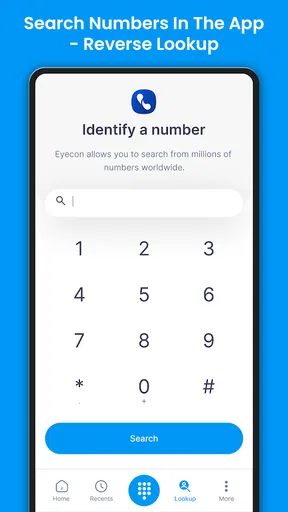
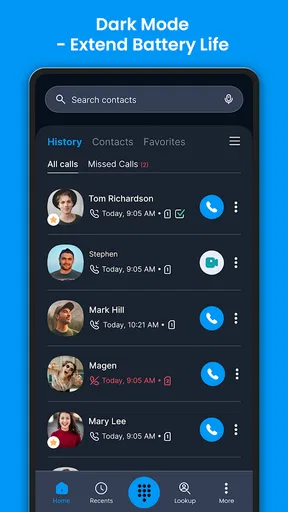
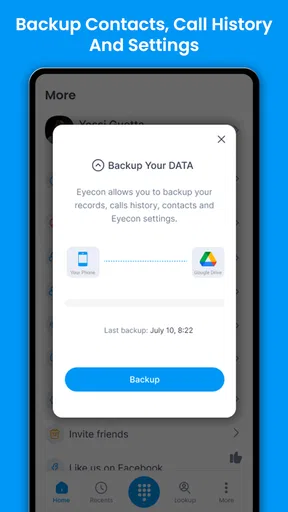
Our Review of Eyecon Caller ID & Spam Block
 Analysis by Appyee
I find Eyecon Caller ID & Spam Block most useful when I treat it as a call-screening companion rather than a replacement for my phone’s entire calling system. Its main job is to help put a name to unfamiliar callers and give me ways to handle unwanted calls, while its visual approach adds context to the people already in my contacts. That combination can make a busy call list easier to navigate, but it works best when I take a moment to decide which parts of the experience I actually want.
A practical routine for unfamiliar calls
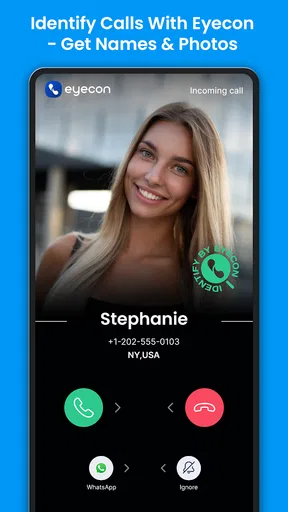
My baseline workflow is simple: when an unknown number appears, I look at the caller information before deciding whether to answer, ignore it, or deal with it later. A name or photo can make a call feel less like a guess, but I still treat that information as a clue rather than proof of who is calling. If a call matters, I can answer; if it does not, I can leave it unanswered and assess it on my own terms.
That distinction is especially useful during a normal workday. Imagine I am expecting a delivery or a call about an appointment, but I do not recognize the number. Caller identification may give me a reason to pick up instead of dismissing every unfamiliar call. At the same time, a caller label should not make me share personal details automatically. I use the information to make a better first decision, not to skip common-sense caution.
For recurring nuisance calls, the helpful habit is to review how I want blocking to work rather than assuming every unknown number deserves the same treatment. A block list can be useful for numbers I have already decided not to hear from again; broader automated screening may suit someone who gets frequent unwanted calls and is comfortable letting the app make more decisions. Keeping those approaches distinct helps avoid the frustrating trade-off of silencing a call I was actually waiting for.
Settings and choices worth checking
Because the app works with calling and contact information, I would read each permission request and consider whether the feature I want depends on it. Access to contacts and call logs is part of the setup described in the original experience, but permissions still deserve a deliberate choice. I would not tap through simply because a prompt appears: I would connect the access I need to the task I expect the app to perform.
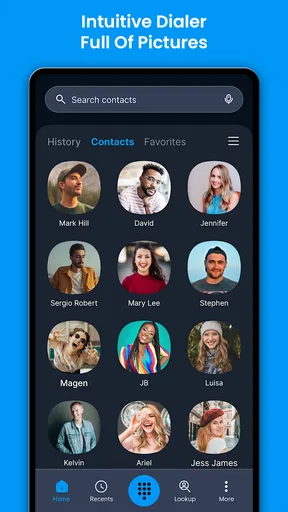
The social and visual side also calls for a personal preference check. Seeing contact pictures can make familiar callers easier to recognize, but not everyone wants a more decorated calling screen or social information mixed into a utility app. If that extra context is useful to me, it adds warmth; if I prefer a plain dialer, it may feel like clutter. The right setup is the one that makes calls clearer without making the phone feel busier.
One practical tip is to keep my own contacts tidy before judging how helpful caller identification feels. A clear contact entry makes it easier to distinguish people I know from numbers I have not saved, while duplicate or outdated entries can create confusion in any caller ID tool. I would also revisit blocked numbers occasionally, especially if I have been using a broad blocking approach. A quick review is a sensible safeguard against keeping an important number out by mistake.
Where it fits among calling options
Compared with a basic phone dialer, Eyecon puts more emphasis on identifying callers and presenting contact photos, rather than only showing a number and call controls. That can be a better fit for someone who regularly receives calls from unfamiliar numbers or likes a visual contact experience. A standard dialer remains the cleaner option for people who mainly place calls, want fewer moving parts, or are content with the caller information their phone already provides.
It is also worth separating caller identification from spam protection. Identifying a number can help me decide what to do, while blocking is about preventing calls I do not want. Neither approach guarantees that every unknown call will be correctly understood or that every unwanted caller will be stopped. I would keep the app’s screening useful but not absolute: if a call looks suspicious, I can ignore it, and if a legitimate call is blocked, I can adjust my choices rather than assuming the system will get every edge case right.
Who will appreciate the extra control
I would recommend this kind of setup to people who field frequent unknown calls, want a quick visual cue before answering, or enjoy seeing photos alongside contact names. It can also suit anyone who wants a more active way to manage nuisance callers than relying only on the phone’s standard call history. The app is free to install, and its communication focus is clear; optional in-app purchases range from about fifty cents to around forty dollars per item, so I would check what is offered before buying anything.
On the other hand, I would skip it if I want the simplest possible dialer, prefer not to grant calling-related access, or do not want social and visual details around my contacts. People who receive few unwanted calls may find that their built-in phone tools already cover the occasional screening decision. Eyecon is most convincing when its caller context and blocking options solve a real, repeated annoyance rather than adding another layer to a phone that already feels busy.
The app is made by Eyecon Phone Dialer & Contacts and is listed for everyone, with an average rating of about 4.4 from roughly 1.2 million ratings. Its reach—over 100 million installs—suggests that this style of caller ID has broad appeal, though popularity cannot tell me whether its choices match my own privacy and calling habits. The version available now is 4.2026.06.01.1433 and it supports Android 6.0 and later; those details are useful to check against an older device before installing.
In the end, I see Eyecon as a practical layer for people who want more context at the moment a call arrives. My best advice is to start with the caller information you value, choose blocking carefully, and adjust the setup after seeing how it handles your ordinary calls. That makes the app less about handing over every decision and more about building a repeatable routine: recognize what you can, screen what you should, and stay cautious when a number is unfamiliar.
Eyecon Caller ID & Spam Block is like having a personal assistant who’s always on the job, ready to block those pesky spam calls and identify unknown numbers. I gave it a whirl, and here's what I found in my deep dive into this handy app.
First Impressions
Jumping right into Eyecon Caller ID & Spam Block, the first thing that caught my eye was the sleek and intuitive interface. It’s like opening a new gadget that’s both exciting and inviting. The app doesn’t bombard you with a bunch of complicated settings right off the bat, which is a big win in my book.
Setting up was a breeze. A few taps and you're ready to roll, with the app asking for the necessary permissions to access your contacts and call logs. Don’t worry, it’s all above board and essential for the app to do its magic.
Features That Stand Out
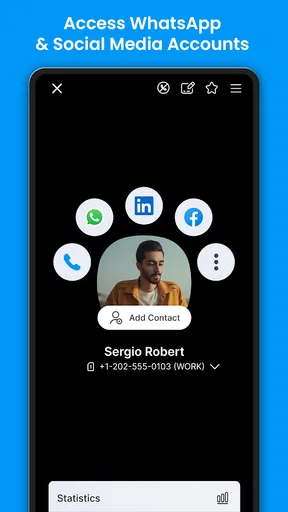
One of the coolest features is the real-time caller ID. Imagine your phone ringing, and instead of the usual unknown number, you get a name, photo, and even the caller's social media profile. It's like unraveling a mystery before you even answer the call!
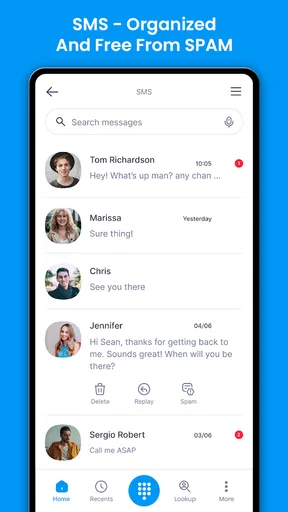
The app’s ability to block spam calls is another highlight. It’s incredibly satisfying to see those annoying telemarketer calls getting automatically hung up on. You can customize your block list or let the app’s algorithm do the heavy lifting. It’s like having a bouncer for your phone.
The app also offers a unique visual and social experience for your contacts. It syncs with social media accounts, so you can see your friends' latest pictures and status updates when they call you. It’s a small touch, but it adds a personal flavor to your calls.
Using the App Daily
After using the app for a week, I noticed my call experience became a lot smoother. Those annoying spam calls? Practically vanished. And when an unknown number did call, I had all the info I needed to decide whether to pick up or let it go to voicemail.
One thing I appreciated was the app’s low impact on battery life. Some apps tend to drain your phone, but Eyecon Caller ID & Spam Block runs quietly in the background without any noticeable lag or battery drain. It’s like having a ninja on your team who gets things done without making a fuss.
Final Thoughts
Overall, I’d say Eyecon Caller ID & Spam Block is a must-have for anyone tired of spam calls and eager to add a bit of flair to their calling experience. It’s user-friendly, efficient, and does exactly what it promises. Plus, it’s available for both Android and iOS, so everyone can get in on the action.
If you’re looking to reclaim your phone from the clutches of spam and unknown numbers, give this app a shot. It’s like having a personal assistant who knows exactly how to handle those unwanted calls while keeping your conversations as personal and friendly as possible.
Privacy and Permissions
See what permissions an app requests and how it handles your data.
- Identity
- find accounts on the device
- Contacts
- find accounts on the device, read your contacts, modify your contacts
- Location
- approximate location (network-based), precise location (GPS and network-based)
- SMS
- read your text messages (SMS or MMS), receive text messages (SMS), send SMS messages
- Phone
- directly call phone numbers, modify phone state, reroute outgoing calls, read call log, read phone status and identity, write call log
- Photos/Media/Files
- read the contents of your USB storage, modify or delete the contents of your USB storage
- Storage
- read the contents of your USB storage, modify or delete the contents of your USB storage
- Camera
- take pictures and videos
- Microphone
- record audio
- Wi-Fi connection information
- view Wi-Fi connections
- Device ID & call information
- read phone status and identity
- Other
- view network connections, create accounts and set passwords, pair with Bluetooth devices, access Bluetooth settings, change network connectivity, disable your screen lock, full network access, change your audio settings, run at startup, reorder running apps, draw over other apps, control vibration, prevent device from sleeping, modify system settings, install shortcuts, Google Play license check
Verdict
Strengths of Eyecon Caller ID & Spam Block
- Intuitive and easy-to-use interface.
- Accurate caller ID with photo display.
- Seamless integration with contacts.
- Effective spam blocking feature.
- Minimal impact on battery life.
Limitations of Eyecon Caller ID & Spam Block
- Limited features in free version.
- Occasional delays in caller ID display.
- Requires internet for full functionality.
- Ads can be intrusive for free users.
- Some features need premium upgrade.
Similar Picks in This Category
View All
Google Messages
Google LLC4.6

Gmail
Google LLC4.1

Google Meet
Google LLC4.4

Google Chrome
Google LLC4.1

WhatsApp Messenger
WhatsApp LLC4.6

Carrier Services
Google LLC4.2
Frequently Asked Questions
What is Eyecon Caller ID & Spam Block, and how does it work?
Eyecon Caller ID & Spam Block is an app designed to enhance your calling experience by providing real-time caller identification and spam blocking. It uses a comprehensive database to identify unknown numbers and automatically block spam calls. The app also offers features like photo sync, social media integration, and a user-friendly interface to improve call handling.
Is Eyecon Caller ID & Spam Block free to use?
Eyecon offers both free and premium versions of its app. The free version includes basic features such as caller ID and spam blocking. However, to access advanced features like ad-free experience, enhanced spam protection, and priority support, users can opt for the premium subscription. Pricing details are available within the app.
How does Eyecon protect my privacy and data?
Eyecon takes privacy seriously by following strict data protection protocols. The app requires access to your contacts and call logs to function effectively, but it does not store or sell personal data. Eyecon complies with global data protection regulations, ensuring that your information remains secure and private.
Can Eyecon block all spam calls effectively?
While Eyecon Caller ID & Spam Block is highly effective in identifying and blocking most spam calls, no app can guarantee 100% accuracy. However, Eyecon continuously updates its database to improve spam detection. Users can also manually report spam numbers to enhance the app's effectiveness for the community.
What devices are compatible with Eyecon Caller ID & Spam Block?
Eyecon is compatible with both Android and iOS devices. It supports a wide range of smartphones, but users should ensure their device's operating system is up-to-date to enjoy the latest features and improvements. Check the app’s page on the Google Play Store or Apple App Store for specific compatibility information.
